
How to install
A few steps. You need your own copy of SWOS 96/97 (CD or GOG) and the Chrome or Edge browser.
One-click install
- Download the patcher from the release page and open it in Chrome or Edge.
Download the patcherAvailable with 4.0
- Press "Choose the game folder" and pick the game's folder (below: where it is, version by version).
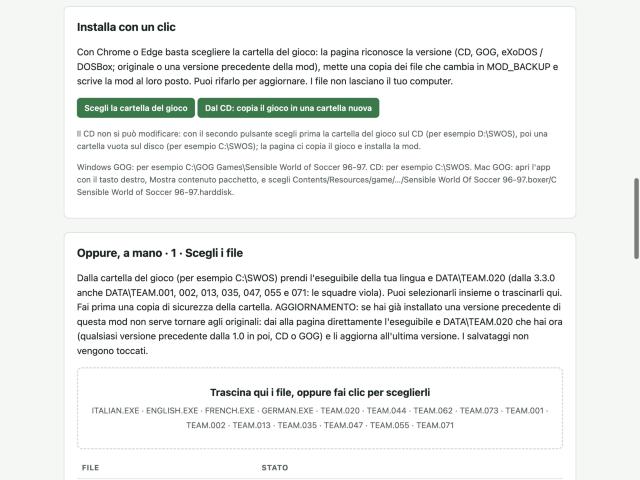
- The page recognises your version, puts a copy of the files it changes in the MOD_BACKUP folder and writes the mod in their place. Done: start the game and begin a new career. Run it again to update. Your files never leave your computer.
With Firefox or Safari, use the manual method further down the same patcher page: drop your language's executable and the DATA files, download the patched files and copy them into the game folder (the TEAM files into DATA), after backing it up.
GOG on Windows
- With the offline installer the folder is usually C:\GOG Games\Sensible World of Soccer 96-97; with GOG Galaxy C:\Program Files (x86)\GOG Galaxy\Games\Sensible World of Soccer 96-97.
- Or wherever you installed it: the folder that contains ENGLISH.EXE and SWOS97.dat.
GOG on Mac
- The folder to pick is deep inside the app (an app inside an app): in Applications, right-click Sensible World of Soccer 9697 → Show Package Contents, then again on the inner app.
- The full path: Sensible World of Soccer 9697.app/Contents/Resources/game/Sensible World Of Soccer 96-97.app/Contents/Resources/Sensible World Of Soccer 96-97.boxer/C Sensible World of Soccer 96-97.harddisk
- In the folder picker press Cmd+Shift+G and paste the path.
CD with DOSBox
- A CD cannot be changed: press "From the CD: copy the game into a new folder", pick the game folder on the CD first (for example D:\SWOS), then an empty folder on your disk (for example C:\SWOS). The page copies the game there and installs the mod.
- In DOSBox, mount that folder as C: and start the game as always.